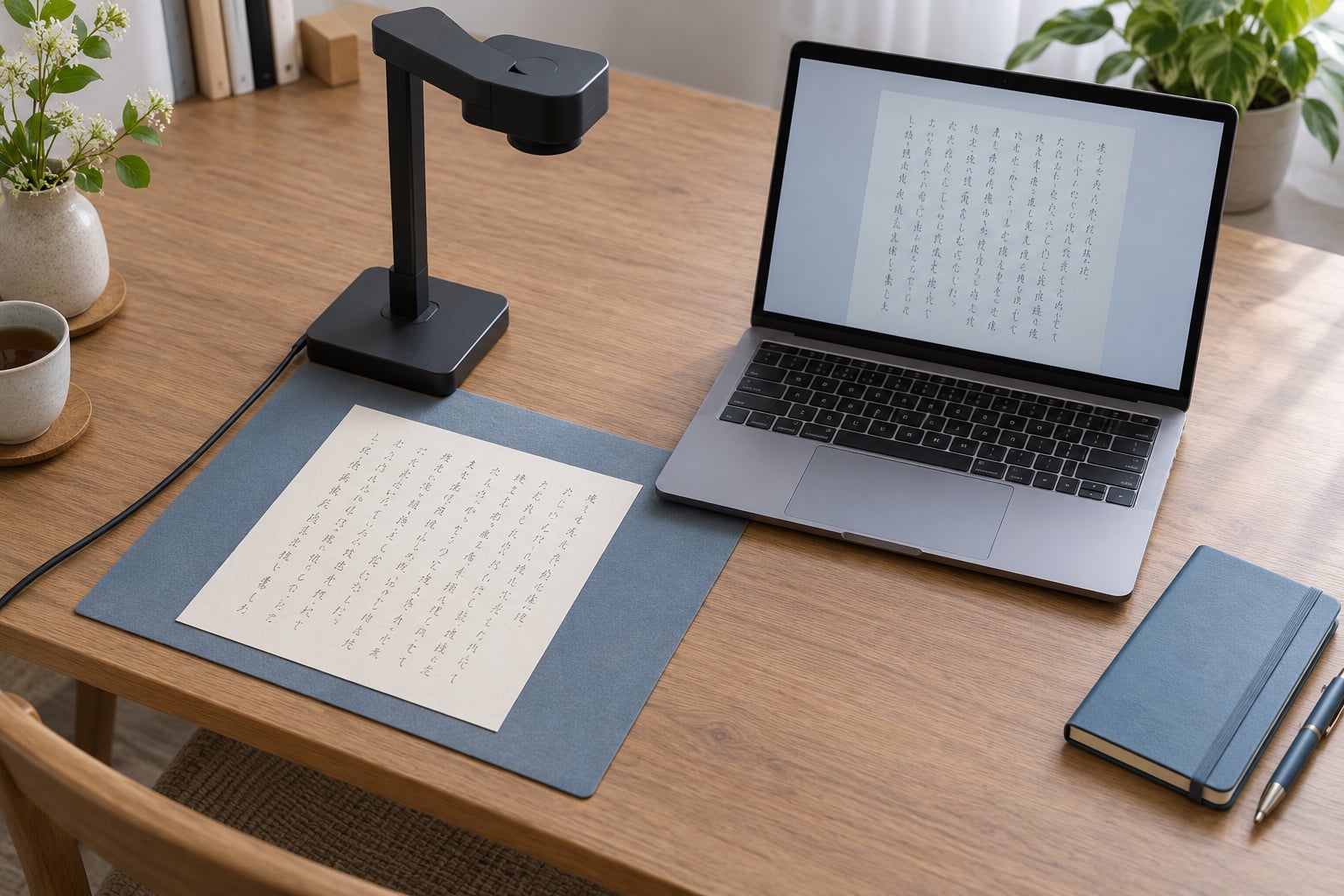
Japanese OCR handles handwriting in stages: it cleans up the image, finds the text lines, decides where one character ends and the next begins, guesses a kanji or kana for each stroke group, then hands the raw character sequence to a Japanese language model that swaps in readings that make real words. That final step is where names and technical terms get quietly overwritten.
The stage that matters most, though, is often the first one. A skewed photo with a shadow across the page loses characters before any model ever sees them, and no amount of language context brings them back.
Table of Contents
- 1How Japanese OCR Handles Handwriting
- 2Traditional segmentation-based OCR
- 3End-to-end neural recognizers
- 4Multimodal large language models
- 5Why Japanese Handwriting Is Hard for OCR
- 6Three scripts in a single line
- 7Thousands of near-identical kanji
- 8No spaces between words
- 9Dakuten and handakuten go missing
- 10Connected strokes and personal style
- 11Vertical writing is a different problem
- 12The Japanese OCR Pipeline from Scan to Text
- 13Why handwriting is harder at every one of those stages
- 14How Handwriting Models Learn Japanese Characters
- 15What the training data looks like
- 16Writer variation is the hard part
- 17Segmentation-free beats segmentation-based on handwriting
- 18Lexicon constraints narrow the search
- 19Language-model correction helps and hurts
- 20Common Japanese OCR Errors and Confusions
- 21Failures reported by people who do this every day
- 22Vertical text has its own failure list
- 23How to Improve Recognition of Handwritten Japanese
- 24Capture the page properly
- 25Pick the right recognition path
- 26Validate the low-confidence parts
- 27Know when to turn off language correction
- 28Printed Japanese vs. Handwritten Japanese
- 29Handwriting input is not handwriting OCR
- 30Frequently Asked Questions
- 31Can OCR accurately read handwritten Japanese?
- 32How do I scan vertical Japanese text without mixing up the column order?
- 33What is the best OCR option for forms containing Japanese and English?
- 34How can I process hundreds of handwritten Japanese pages?
- 35Why does OCR replace a rare Japanese name with a more common word?
- 36Conclusion: Start with a Clean, Testable Document
How Japanese OCR Handles Handwriting
Japanese OCR reads handwriting by combining visual feature extraction, a recognition model trained on Japanese characters, and a Japanese language model that corrects the result using context. Accuracy still depends on legibility, page layout, the writing style, and which engine you use. Printed Japanese is largely solved. Handwritten kanji is not, and vertical text is harder still.
There are three families of system doing this work, and they fail in different ways.
Traditional segmentation-based OCR
Tesseract and older commercial engines assume the page contains separated characters in neat rows. They find a line, cut it into boxes, classify each box, then run dictionary lookup. That assumption collapses on connected pen strokes, which is most handwriting.
End-to-end neural recognizers
These skip character boxes entirely. A convolutional or transformer encoder reads the whole line or the whole page as a sequence of strokes and emits a character sequence directly. Segmentation-free models handle touching and cursive writing far better, and they are the backbone of most current Japanese handwriting work.
Multimodal large language models
Send a photo to a general-purpose vision model and it will happily transcribe it. It reads messy pages surprisingly well because it has seen a huge amount of rendered and photographed text. What it does badly is signal when it is unsure, and it tends to write what a sentence probably says rather than what the page literally shows.
Why Japanese Handwriting Is Hard for OCR
Japanese is regularly described as the hardest widely-used writing system for optical character recognition, and handwriting pushes it further. The problems stack.
Three scripts in a single line
One sentence can contain kanji (logographic characters, roughly 2,136 in the jōyō list used in Japan), hiragana (46 cursive phonetic characters), and katakana (46 angular phonetic characters, mostly for loanwords). Katakana words like コンピューター sit right next to hiragana particles, which sit right next to kanji, with no visual signal that the script has changed.
Thousands of near-identical kanji
Many kanji differ by a single short stroke or a small component in the same position. 刀 and 力, 土 and 士, 未 and 末, 人 and 入. A pen that lifts early or a blob of ink where a crossing should be flips one into the other, and the recognizer has no way to know which the writer meant.
No spaces between words
Japanese is written without spaces between words, so the system has to infer boundaries from meaning. Latin-script OCR mostly segments on whitespace and then reads. Japanese OCR has to do both jobs at once, and any mistake in the reading feeds back into the segmentation.
Dakuten and handakuten go missing
The voicing marks are tiny. は becomes ば with dakuten, and ば becomes ぱ with handakuten. When a pen is light or a scan is soft, those two dots disappear and は is all the recognizer sees. The result reads correctly but means something different, which is the most dangerous kind of error because nothing looks broken.
Connected strokes and personal style
People write the same kanji differently from each other, and differently from how they are printed in a dictionary. Right-handed writers leave hooks on the lower-right of certain characters, left-handed writers smear the left side. Tendency to rush at the end of a line changes character shapes within a single sentence.
Vertical writing is a different problem
Tategaki runs top to bottom, with columns starting at the right side of the page. Most engines are trained overwhelmingly on horizontal text, so reading order, line grouping and punctuation rotation all break. An evaluation of multimodal models on vertically written Japanese (arXiv 2511.15059) found that general-purpose vision models read vertical Japanese noticeably worse than horizontal Japanese, and that fine-tuning on a synthetic dataset of rendered vertical text closed much of the gap.
The Japanese OCR Pipeline from Scan to Text
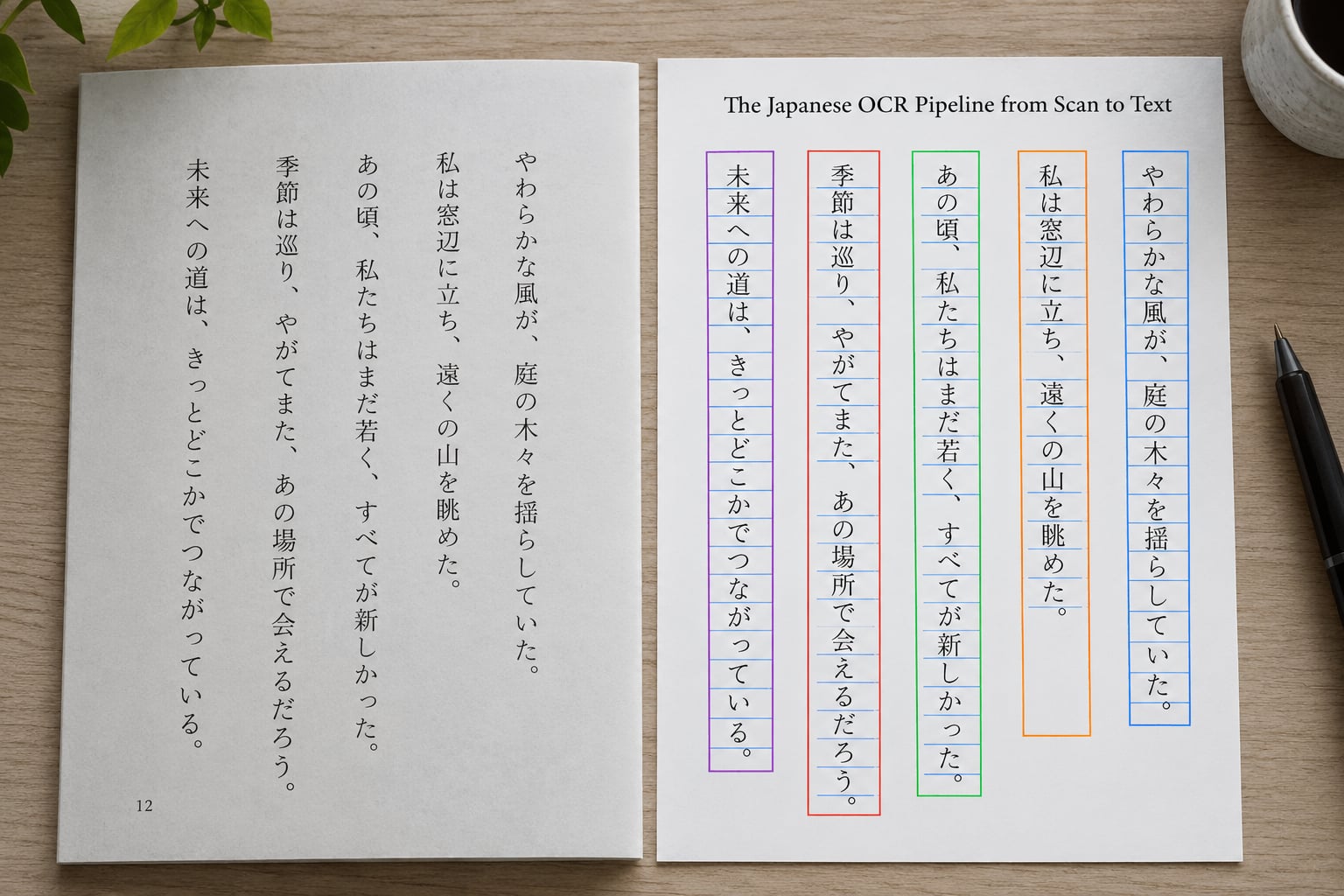
Here is the sequence your photo goes through. Knowing which stage went wrong tells you whether to re-scan or change tools.
- Image capture and preprocessing. The image is deskewed so baselines are level, the background is normalized, and contrast is stretched so faint strokes cross a threshold. Illumination is flattened so a shadow across the middle of the page does not read as ink. Noise reduction runs here too, and it is a genuine trade-off: aggressive smoothing erases the thin stroke tails that separate look-alike kanji.
- Layout detection. A layout model finds text regions, figures, tables and margins, and assigns a reading order. On a two-column form or a page where a printed label sits beside a handwritten field, this stage decides what is read first.
- Script and region classification. The system decides whether a region is printed, handwritten, or a mix, and whether the text is horizontal or vertical. Regions that mix printed labels with handwritten answers are usually processed by different recognizers and stitched together afterwards.
- Line segmentation. For horizontal text the page is cut into rows. For vertical text it is cut into columns, and the reading order has to run in reverse across the page. Row or column detection is where a ruled table, a margin note, or a line that runs into the binding causes whole lines to be skipped or duplicated.
- Character segmentation. Some engines cut lines into individual character images here. This is where handwriting hurts most, because neighbouring strokes touch and a naive cut slices one kanji into two halves. Most modern systems skip this and use segmentation-free recognition.
- Classification and decoding. A neural network maps the strokes to a probability distribution over Japanese characters. Because many characters look similar, the distribution is rarely confident on a single character; it is confident about the shape and uncertain about the identity.
- Language-model correction. The character sequence goes to a language model trained on Japanese text, which rewrites it into the most probable real sentence. Beam search over several candidate sequences, a dictionary of valid words, and conversion rules for kana and kanji spelling all play a role here.
- Output and validation. The text is emitted with, ideally, per-character or per-word confidence scores. Without those scores you have no way to know which parts to proofread, and Japanese output gives you very few obvious signals that something is wrong.
Why handwriting is harder at every one of those stages
Printed text has consistent stroke widths, regular spacing and no ambiguity about character boundaries. Handwriting has all three problems at once, so deskewing is less reliable, line detection is less certain, segmentation fails more often, and the classifier gets a wider spread of inputs it was never trained on. By the time the language model steps in, it may be repairing several errors at once and choosing one wrong character instead of another.
How Handwriting Models Learn Japanese Characters
Training data is the whole story. A model that has seen ten thousand printed pages of kanji is a bad kanji handwriting recognizer.
What the training data looks like
Good Japanese handwriting datasets mix real handwritten pages, collected from students and volunteers, with synthetic pages generated by rendering characters in many typefaces and applying distortions that imitate pen strokes, ink spread and scanning artifacts. Synthetic data is cheap and can cover rare kanji that no real dataset contains. Its weakness is that distortions are still synthetic, so models trained heavily on it sometimes handle a real messy page badly.
Writer variation is the hard part
Researchers deliberately collect the same characters from many writers, because the model has to learn that a character is defined by its structural skeleton rather than its exact stroke shape. The community pattern is consistent: accuracy is excellent for kanji a person writes daily and drops sharply for rare kanji. A learner with around 3,400 kanji studied and roughly 2,000 in regular use described recognition as strong for their everyday characters and poor beyond that, and that is the normal shape of the problem.
Segmentation-free beats segmentation-based on handwriting
Recurrent and transformer encoders read a whole line as a sequence and learn from context inside the line, which handles touching strokes naturally. They cost more compute and lose explicit character bounding boxes, but for handwriting the trade is worth it. This is the reason older engines report discouraging results on cursive writing while newer models do not.
Lexicon constraints narrow the search
A recognizer can be constrained to output only character sequences that could be valid Japanese, using a dictionary, a statistical language model, or conversion rules such as never leaving a word starting with a small kana except for a handful of grammatical cases. That cuts the error rate on ordinary prose and does nothing for names, where the correct reading is rare by definition.
Language-model correction helps and hurts
A language model will turn a garbled reading of a personal name into a common word with a similar shape, because that is what it has seen most often. The same mechanism fixes a mis-segmented compound and silently rewrites a rare surname. On dictionaries, forms and technical notes, this is the single biggest source of plausible-looking wrong output.
Common Japanese OCR Errors and Confusions
Most errors are not random. They fall into a small number of repeatable families, and if you have seen one you will see it again.
| Confusion | Why it happens | What you get |
|---|---|---|
| は and ほ | Differ by one short stroke; light or fast writing erases it | A verb or particle read as the wrong word, with valid-looking grammar |
| ハ and バ | Dakuten too faint to register | Plausible sentence, wrong meaning |
| ン and ソ | Two short strokes merge into one under ink spread | Wrong word boundary or wrong word entirely |
| 刀 and 力, 土 and 士, 未 and 末 | Single stroke position differs; pen placement varies per writer | Correct-looking but wrong kanji |
| シ and ツ, ヘ and へ | Katakana and hiragana look near-identical, and script is often decided by context alone | Kana in the wrong script, or the wrong reading |
| Katakana ソ and hiragana ん | Similar shapes in different scripts | Meaning drift inside a sentence |
| ー and 丨 or 、 | Long vowel mark and punctuation are thin marks, often dropped | Broken word boundaries |
| Whole line lost or repeated | Row detection fails on a slanted baseline or a ruled form | Missing text with no error reported |
Failures reported by people who do this every day
A learner on r/LearnJapanese noted a dictionary and OCR app read everything correctly except 頑張れ, a word that mixes kanji with kana. Another person on the same subreddit uses a Chinese OCR app to read Japanese kanji on signs, which works often enough to be useful because many kanji are shared between the two languages. A r/learnpython user testing open OCR got roughly 60% accuracy and concluded the free options were not worth the trouble. On r/viwoods, a user comparing printed capitals with cursive writing saw accuracy swing from about 60% up to 95% and above purely on writing style, which is a fair warning about headline accuracy claims in general.
Vertical text has its own failure list
Punctuation rotates, small kana and marks shift to the upper right of their cell, and columns read in the opposite direction from the page layout a model expects. The arXiv 2511.15059 evaluation reported that multimodal models score lower on vertically written Japanese than on horizontal Japanese using the same content, which is why vertical pages deserve their own test set rather than being mixed into a general accuracy number.
How to Improve Recognition of Handwritten Japanese
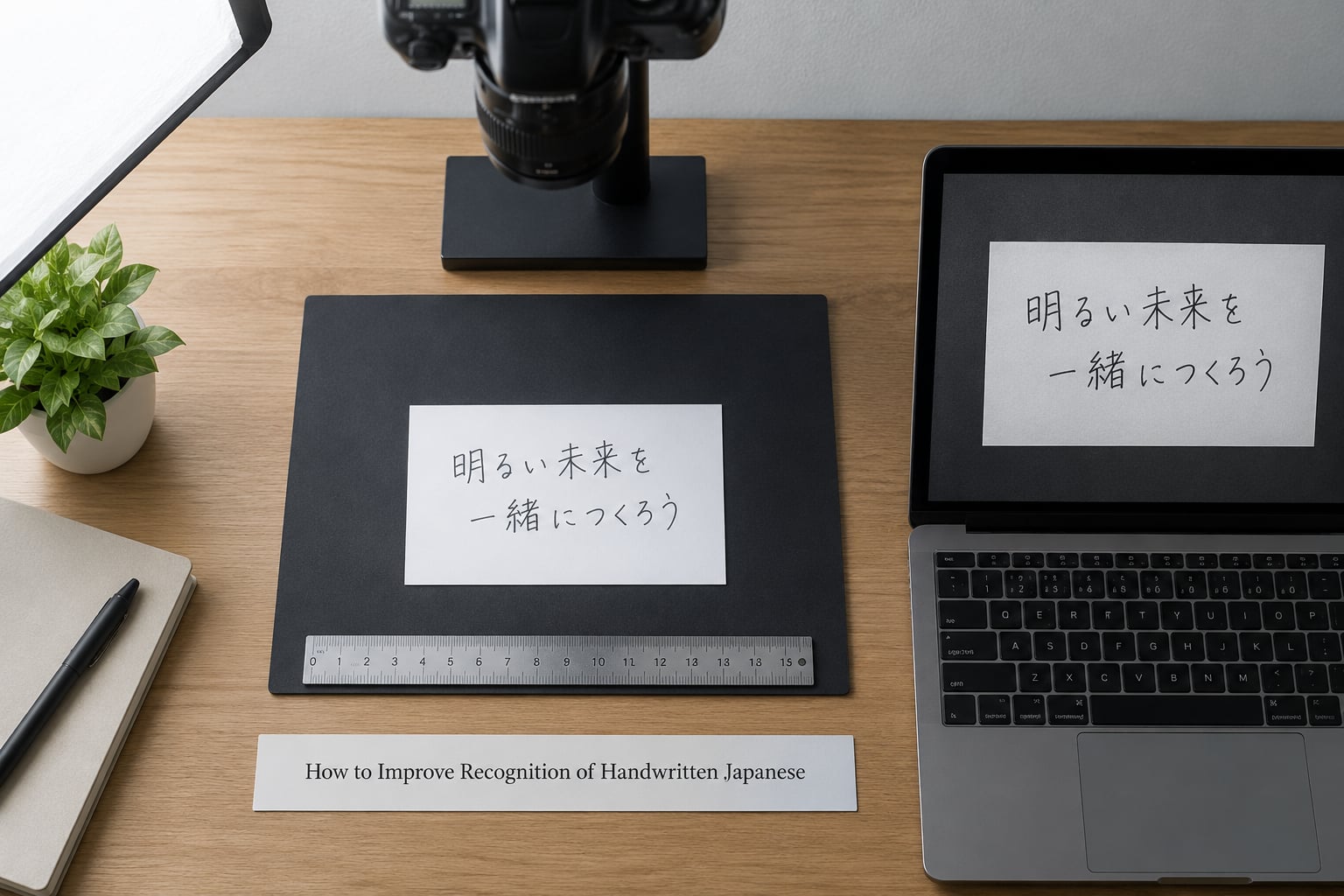
Most of the gain available to a non-developer comes from capture quality and validation, not from a different model. Work through these in order.
Capture the page properly
- Use the highest resolution available. Aim for roughly 300 DPI at the final image size; below about 200 DPI, dakuten marks and thin stroke tails disappear.
- Light evenly from both sides. One hard light source creates a shadow that reads as ink. Bounced or diffuse light removes it.
- Keep the page flat. A curved page bends characters near the spine, which changes their shape. Press gently or scan in sections.
- Shoot straight on and correct orientation before processing. Tilt of a few degrees is usually recoverable, but a page scanned upside down or rotated 90 degrees is often not.
- Keep strokes distinct. Not your handwriting style for its own sake, but pen pressure and speed. A fine ballpoint that skips, and a pencil pressed hard enough to bleed through, both lose information.
- Crop to one column at a time for vertical text. This removes the reading-order ambiguity that causes columns to be reordered.
Pick the right recognition path
For a single page of ordinary mixed handwriting, a multimodal vision model is the fastest route and handles messy kana well. For hundreds of pages where you need character confidence scores and reproducible output, an end-to-end recognizer with a Japanese language profile beats a general vision model. For on-device capture with no network, use the handwriting support built into the phone or scanner app, which is built for the writer you are scanning rather than for an unknown writer.
Validate the low-confidence parts
If your engine outputs per-character confidence, sort the page by it and check the bottom tenth first. If it does not, check the fields most likely to fail: names, dates, addresses, kanji the writer uses rarely, and any katakana loanword.
Know when to turn off language correction
Limit or disable language-model correction on names, dictionaries, technical specifications and legal documents, because the model is optimized for common words and those fields are made of uncommon ones. Keep it enabled for running prose, notes and correspondence, where it repairs segmentation errors more often than it creates them. If the pipeline offers a raw output mode alongside the corrected one, keep both and diff them; the differences are exactly where the errors live.
Printed Japanese vs. Handwritten Japanese
Printed and handwritten Japanese are different recognition problems that happen to share an output format. Treating them as one leads to bad tooling choices.
| Factor | Printed Japanese | Handwritten Japanese |
|---|---|---|
| Character boundaries | Clean and regular | Often touching or merged |
| Stroke shape consistency | Identical across the page | Varies by writer, speed and ink |
| Segmentation approach | Box-based works well | Segmentation-free is needed |
| Language-model help | Mostly confirms what is already there | Does real repair work, and sometimes overwrites correct text |
| Main failure mode | Bad scan quality or unsupported fonts | Look-alike characters and dropped voicing marks |
| Vertical support | Often built in | Frequently missing or weak |
| Best use | Contracts, invoices, books, forms | Notes, diaries, field forms, archives |
| Human review needed | Spot checks on unusual layouts | Character-level proofreading by a reader |
Handwriting input is not handwriting OCR
Writing kanji with a finger on a phone screen and scanning a paper page are two different systems, and the first is far more accurate. The phone knows the writer, has the stroke order and the timing of every stroke, and only has to guess which of a few hundred candidates fits. Paper OCR sees one static ink pattern with none of that information.
The tradeoff is speed. Plenty of intermediate and advanced learners report that writing answers with pen and paper first, then typing them in, is faster and more accurate than handwriting input, because stroke-by-stroke kanji entry takes a long time even when recognition is correct.
Frequently Asked Questions
Can OCR accurately read handwritten Japanese?
Yes, for neat handwriting with a modern engine, but not reliably across a whole page. Accuracy is high on kana and on kanji the writer uses regularly, lower on rare kanji, and drops further for connected strokes, faint pencil and vertical text. Expect usable output with proofreading rather than a clean transcript, and check names, dates and any katakana loanword first.
How do I scan vertical Japanese text without mixing up the column order?
Scan one column at a time, so there is no ambiguity about which column comes next, and tell the tool the page is vertical (tategaki) if it offers that setting. General-purpose vision models read vertical Japanese worse than horizontal Japanese, so treat vertical pages as a separate test set. The arXiv evaluation of vertically written Japanese shows fine-tuning on rendered vertical text closes much of the gap.
What is the best OCR option for forms containing Japanese and English?
Use an engine that detects script and layout per region rather than one that reads the page as a single block, since Japanese forms usually mix printed labels, handwritten values and Latin fields such as dates and reference numbers. Multimodal vision models are the easiest option for occasional pages. For repeated processing, an API-based recognizer with confidence scores gives you field-level validation.
How can I process hundreds of handwritten Japanese pages?
Batch the job with an end-to-end recognizer rather than prompting a chat model page by page, because you get consistent output, per-character confidence scores and a record you can audit. Capture at around 300 DPI with even lighting, crop to one column for vertical material, keep the raw images, and sort every page by lowest confidence so human review goes where it pays off.
Why does OCR replace a rare Japanese name with a more common word?
Because the language model corrects the character sequence toward text it has seen often, and a rare name is by definition rare. The recognizer may read the kanji correctly and the correction step still swaps it, since it assumes the sentence should read like ordinary prose. Turn correction off or limit it on name fields, and keep both the raw and corrected output so you can diff them.
Conclusion: Start with a Clean, Testable Document
The mechanism behind how Japanese OCR handles handwriting is simple to describe: clean the image, find the lines, guess the characters, then let a language model make the guesses read like Japanese. The hard part is that every stage before the language model can quietly lose a stroke, a voicing mark or a whole line, and the language model will paper over the gap with a plausible word.
So start smaller than feels useful. Run twenty representative pages through one tool, keep the original images, and record errors at the character level rather than counting pages as good or bad. Fix the capture setup first, since a skewed shadowed photo loses more than any model choice can recover. Only after that is clean does a more capable recognizer actually help.